



















How to export every comment from a Reddit thread
Reddit only shows part of a big thread: the rest hides behind dozens of "load more comments" and "continue this thread" links. Copying it by hand is impossible, and the official API needs an app, a key and code. Here is how to get the whole discussion into a clean file in about a minute.
작성자: Pierre Carron · 2026년 10월 업데이트됨
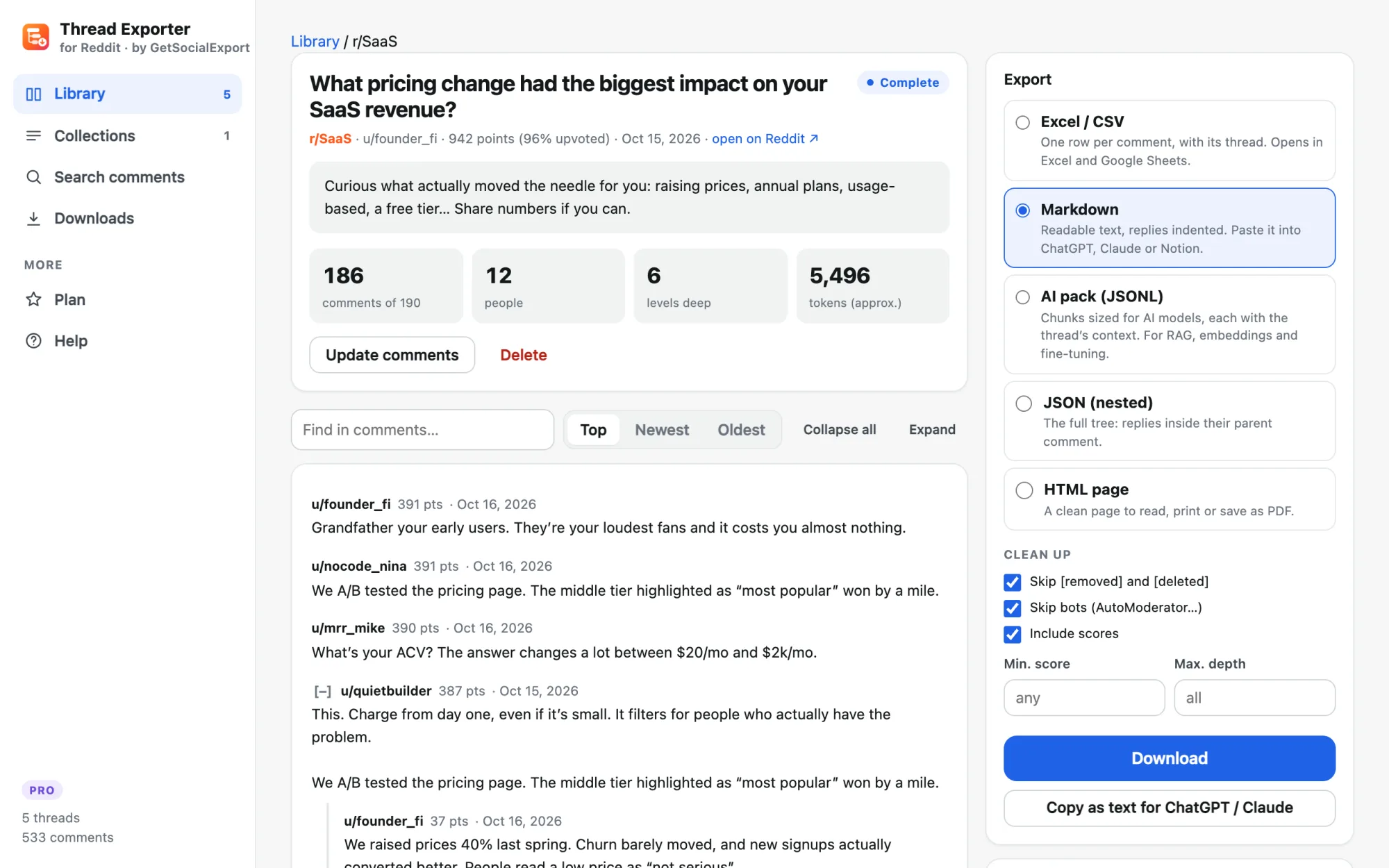
단계별 안내
- Install Thread Exporter. Add Thread Exporter for Reddit to Chrome (it also works on Edge and Brave) and pin it to the toolbar.
- Open the thread. Open the Reddit thread on reddit.com or old.reddit.com, or copy its link.
- Export all comments. Click the extension icon, then "Export all comments". It follows every "load more" and "continue this thread" link for you, at the pace Reddit allows.
- Choose the format. CSV for Excel or Google Sheets, Markdown to paste into an AI assistant, JSON for code, or HTML to read offline. Optionally skip removed comments and bots, or keep only comments above a score.
Why copy-paste and simple scrapers miss comments
A popular thread can have thousands of comments, but the page loads only the first few hundred. The rest is folded into "load more comments" stubs, and deep reply chains continue on separate pages. Tools that read only the first page silently miss most of the discussion.
Thread Exporter asks Reddit for each hidden branch, then rebuilds the tree, so replies stay under the comment they answer, with their depth, score and date.
What are the ways to export a Reddit thread?
There are four common methods. The two free ones without code (copy-paste and the .json link) only get the comments the page has already loaded. To get the hidden replies too, you need the official API with a script, or a tool that does those calls for you.
| Method | Hidden “load more” replies | Code needed | What you get | Limits |
|---|---|---|---|---|
| Copy-paste the page | No | No | Plain text without authors, scores or structure | Hours for a big thread |
| Add .json to the thread URL | No: they stay as “more” placeholders | No, but the JSON needs converting | Nested JSON of the loaded comments | One page of comments per request |
| Reddit API with PRAW (Python) | Yes, with replace_more() | Yes: Python and a registered app | Whatever your script writes | Free tier: 100 requests a minute per app |
| Thread Exporter (browser extension) | Yes, automatically | No | CSV, JSON, Markdown, HTML, AI-ready JSONL | Free up to 300 comments, Pro $19.90 once |
The free .json trick, and where it stops
Add .json to the end of any Reddit thread link (for example reddit.com/r/AskReddit/comments/abc123/title/.json) and Reddit returns the post and its comments as JSON, with authors, scores, dates and the reply tree. It costs nothing and needs no account, which makes it the best option for a small thread.
The catch: the answer contains only the comments the page would have loaded. Every folded branch appears as a “more” object listing comment IDs, which you then have to fetch one batch at a time with the morechildren endpoint and stitch back into the tree. On a thread with thousands of comments, that is hundreds of extra requests.
With the official API and PRAW
If you write Python, PRAW is the standard library. Register a script app in your Reddit preferences, load the thread with reddit.submission(url=…), call submission.comments.replace_more(limit=None) to expand every hidden branch, then loop over submission.comments.list() and write each comment to a CSV.
Reddit’s free Data API tier allows 100 requests a minute per OAuth app, and each replace_more call expands only a batch of comments, so a thread with 10,000 comments takes several minutes. Commercial use needs Reddit’s approval. For research projects that run regularly, the API is the right tool; for a one-off export, an extension is faster.
What you get in the CSV
One row per comment: subreddit, thread id and title, comment id, parent id, depth, author, whether it is the original poster, score, date (UTC), edited flag, text and a permalink. The first row is the post itself.
With the parent id you can rebuild conversations in a spreadsheet, and with the score you can sort for the most useful answers.
Is it allowed?
The extension reads public content you can see in your browser, at Reddit's published rate limit. Respect Reddit's terms and the people who wrote the comments: don't republish personal information, and cite your sources.
출처
- Reddit Help: Reddit Data API Wiki (access and rate limits)
- PRAW documentation: Comment extraction and parsing
- Reddit API reference: GET /api/morechildren
다른 가이드
- How to scrape Reddit without the API (and without code)
- How to export a subreddit to CSV, with every comment
- How to feed Reddit discussions to ChatGPT, Claude or your own AI
- How to export a Microsoft Teams chat to PDF
- How to export a Microsoft Teams chat to Excel or CSV
- How to save Microsoft Teams messages as a credible record
- How to save your Microsoft Teams chats before you leave a job
- How to keep a record of a Microsoft Teams conversation