



















How to pick a random Instagram giveaway winner, and prove it was fair
Every giveaway ends the same way: someone asks whether the winner was really chosen at random. Screen-recording a "random comment picker" website proves very little. Here is how to load every comment of your post, apply your rules, draw the winner with public randomness, and give your followers a certificate they can check themselves.
작성자: Pierre Carron · 2026년 10월 업데이트됨
단계별 안내
- Install Giveaway Picker. Add the Giveaway Picker extension to Chrome (it also works on Edge and Brave) and pin it to the toolbar.
- Load the comments of your post. Open your Instagram post or reel while logged in, click the extension icon and click "Load comments". Every comment and reply is saved.
- Set the giveaway rules. Start a giveaway and choose the rules from your post: number of friends to tag, required hashtag, deadline, one entry per person, accounts to exclude. The list of eligible people updates as you type.
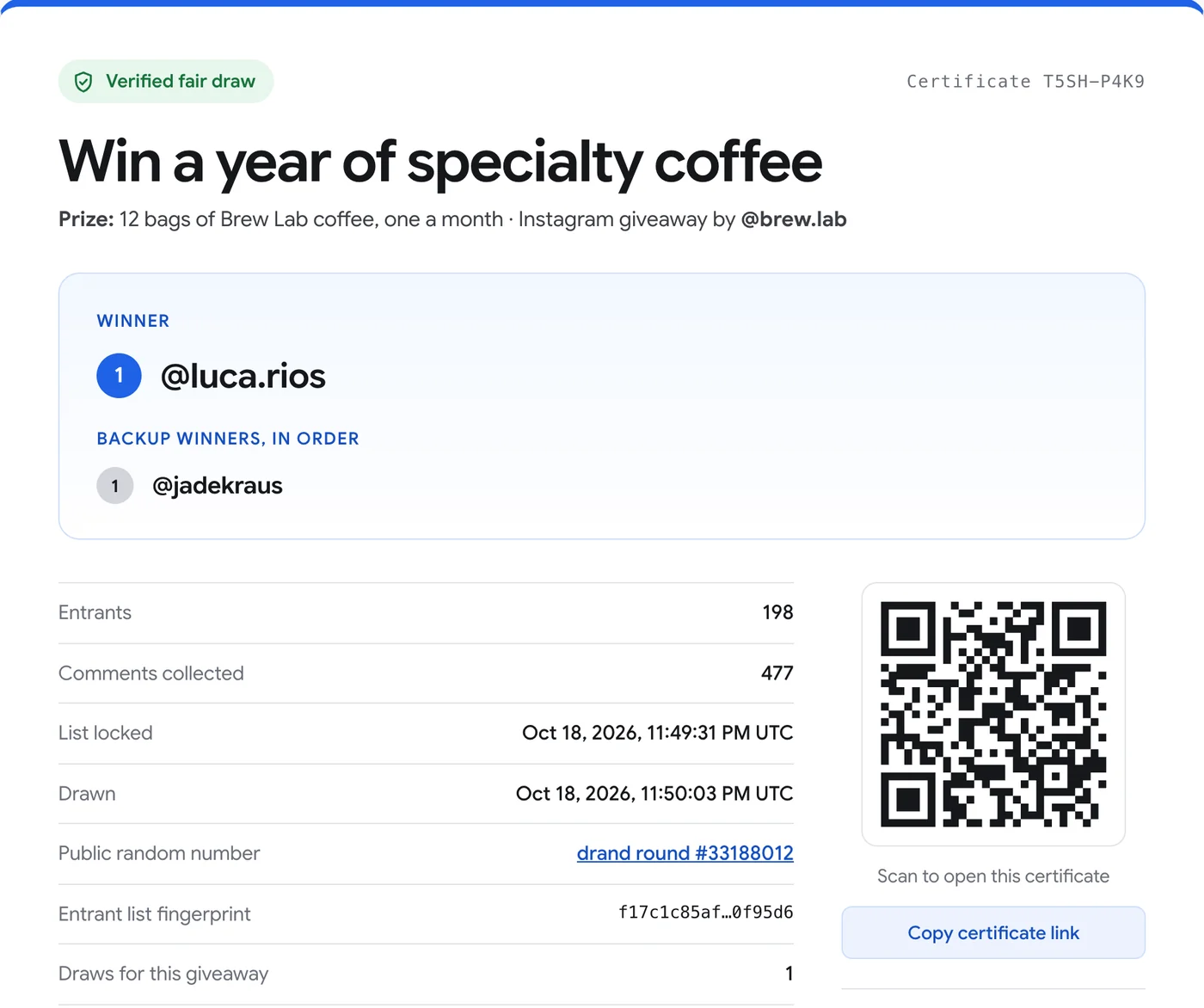
- Draw the winner live. Click "Draw the winner". The entrant list is locked, then the winner is computed from a public random number published about 30 seconds later.
- Share the proof. Post the winner image with its QR code, and share the certificate link in your caption or stories.
Why "random comment picker" websites are hard to trust
Most comment pickers ask for a post link, fetch some of the comments on their server, and show a winner. Nobody can check which comments were included, whether the draw was repeated until a friend won, or whether the result was random at all. A screen recording only shows that a button was clicked.
A verifiable draw works the other way around: the list of entrants is fixed and fingerprinted first, and only then is the random number created, by a public source nobody controls. Anyone can redo the calculation afterwards and get the same winner.
What are the ways to pick an Instagram giveaway winner?
Instagram has no built-in giveaway tool, so hosts use one of three approaches. They all produce a winner; they differ in whether every comment is counted, whether your rules are applied, and what proof your followers get.
| Method | Counts every comment | Applies your rules | Proof for followers | Cost |
|---|---|---|---|---|
| Copy the comments, number them, use a random number generator | Only the ones you copy | By hand | A screen recording | Free |
| Random comment picker website | Depends on the site, and you can’t check | Some rules, depending on the site | A screenshot or recording of the result | Free or paid |
| Giveaway Picker (browser extension) | Yes, every comment and reply | Tags, hashtags, deadline, one entry per person, exclusions | Public certificate that anyone’s browser re-checks | Free up to 300 entrants, Pro $24.90 once |
Rules that match your Instagram post
Copy the rules you announced. "Tag 2 friends" becomes a minimum of 2 tags (tags of your own account and of the commenter don’t count). "Comment with #yourhashtag" becomes a required word. "Ends Sunday 8 pm" becomes the deadline: later comments are excluded.
You can also give one entry per person even if they commented ten times, add bonus entries per extra tag, only count the first N people, or exclude your team, partner brands and past winners. Each excluded comment shows the rule it broke, which makes "why didn’t I win?" messages easy to answer.
How the draw stays fair
When you click Draw, the eligible entrants are sent to our server, put in a fixed order and fingerprinted with SHA-256, and the time is recorded. The server then picks a round of drand, a public randomness beacon run by the League of Entropy, that will only be published about 30 seconds later.
Once that random number exists, the winners are computed from it with a published algorithm. Because the list was locked before the random number existed, nobody, you included, could have chosen the winner. Every new draw for the same giveaway is listed on the certificate with its reason.
Announcing the winner
The extension creates a feed image (1080×1350) and a story image (1080×1920) with the winners, the number of entrants and the certificate’s QR code, plus a caption to copy. Followers who scan the code open the certificate, and their browser re-checks the whole draw: the entrant list, the random number’s signature and the winners.
Participants can also type their username on the certificate to check they were in the draw, even if you chose to keep the full list private.
If the winner doesn’t answer
Draw one or more backup winners at the same time: they are listed in order on the certificate. If you prefer to draw again, give a reason (for example "winner did not reply within 48 hours"); the new draw and its reason appear publicly, so the giveaway stays transparent.
Instagram’s rules for promotions
Instagram lets accounts run giveaways, but the host is responsible for running them lawfully: official rules, eligibility, prize and any local sweepstakes laws. Instagram’s promotion guidelines also ask you to say that the promotion is not sponsored, endorsed or administered by Instagram. Avoid tagging people in content they don’t appear in.
The free version loads 300 comments per post and draws among up to 300 entrants with one winner, certificate included. Pro ($24.90 once) removes the limits and combines several posts in one giveaway.
Checklist before you post the giveaway
Write the rules in the caption: how to enter, the deadline with its time zone, who can take part (age, countries), the prize, how many winners, and how and when you will contact them. Add the line Instagram requires, such as “This giveaway is not sponsored, endorsed or administered by, or associated with, Instagram.”
Say publicly that you will only contact the winner from your own account, and never ask for a payment or card details. Fake accounts copying the host’s name and photo to message entrants are the most common giveaway scam on Instagram; a public certificate that names the real winner makes them easy to spot.
출처
- Instagram Help Center: Promotion guidelines
- drand: the distributed randomness beacon
- Cloudflare: League of Entropy
다른 가이드
- How to pick a random TikTok giveaway winner from comments, with proof
- How to pick a random winner from YouTube comments
- How to export Instagram comments to Excel or CSV
- How to pick a random winner from Facebook comments
- How to export a Microsoft Teams chat to PDF
- How to export a Microsoft Teams chat to Excel or CSV
- How to save Microsoft Teams messages as a credible record
- How to save your Microsoft Teams chats before you leave a job