



















How to export Instagram followers to Excel (or CSV)
Instagram shows followers in a small scrolling window and has no download button. Here is how to get the whole list of any public account into a spreadsheet, with bios, websites and follower counts if you need them.
بقلم Pierre Carron · تم التحديث أكتوبر 2026
خطوة بخطوة
- Install Follower Exporter. Add it to Chrome, Edge or Brave, and log in to instagram.com in the same browser.
- Open the profile. Go to the Instagram account whose followers you want, click the extension icon, then "Export followers". You can also type the username in the dashboard.
- Let it read the list. The extension reads the list page by page at a human pace, in the background. Big accounts take a while: it pauses at the hourly and daily limits and continues by itself.
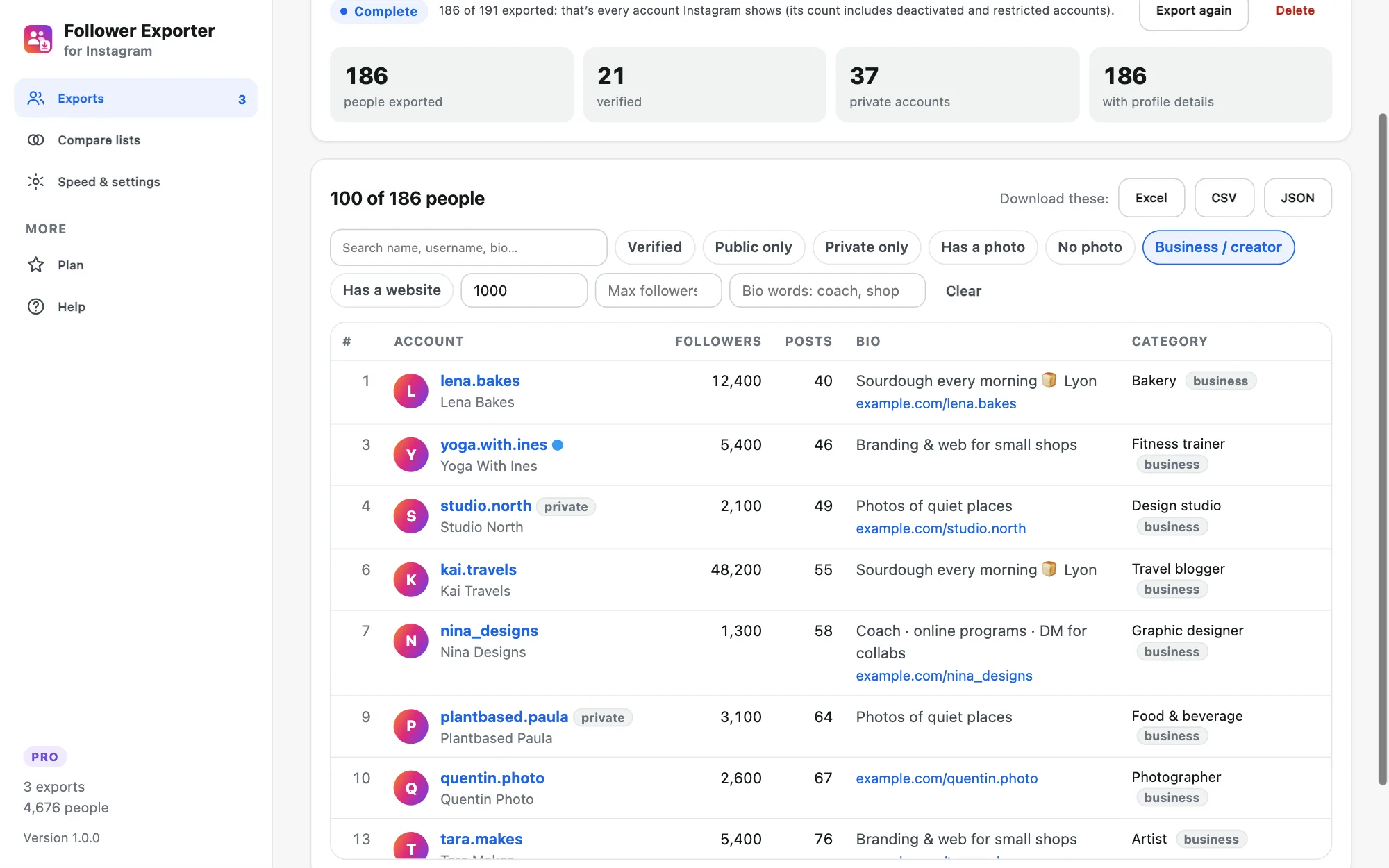
- Download. Click Excel for a .xlsx with filters and a frozen header, CSV for Google Sheets, or JSON. Filter first if you only want some accounts.
What are the ways to export Instagram followers?
There are four realistic ways. Instagram’s own data download is free but only covers your own account. Copying from the followers window works for a few dozen people. Cloud services and browser extensions can export any public account. They differ in what you get, how long it takes and what you have to share.
| Method | Whose followers | Profile details (bio, counts) | Ready for Excel | Effort | Cost |
|---|---|---|---|---|---|
| Instagram “Download your information” | Your own account only | No: usernames, links and dates | No: JSON or HTML to convert | Request, then wait minutes to days | Free |
| Copy from the followers window | Any account you can see | No | No: paste and clean by hand | Hours for a few thousand people | Free |
| Cloud scraping services | Public accounts | Depends on the service | Yes | Sign-up, often your Instagram session cookie | Monthly or per result |
| Follower Exporter (browser extension) | Any public account, and private ones that accepted you | Yes, with Pro | Yes: Excel, CSV, JSON | A few clicks, about 4,000 people an hour | Free up to 100 people, Pro $19.90 once |
The free way for your own account: Download your information
Instagram can send you a copy of your account data, which includes your followers and the accounts you follow. In the app or on instagram.com, open Accounts Center, then “Your information and permissions” and “Download your information”. Choose your Instagram account, select only followers and following, pick the JSON format and “All time”, and submit. Instagram asks for your password and emails you when the file is ready, which can take from a few minutes to a few days. The link expires after a few days.
In the ZIP, look for a folder named followers_and_following (Meta renames it from time to time). Excel can open the JSON with Data › Get Data › From File › From JSON, then expand the records into columns. You get each username, profile link and the date they followed you, but no bio, follower count or category, and only for your own account.
What’s in the file
Each row has the position in the list, username, full name, profile link, user ID, whether the account is verified or private, and whether it has a profile photo. With profile details (Pro), you also get the bio, website link, number of followers, following and posts, the business category and whether it’s a business or creator account.
What can you do with the list in Excel or Google Sheets?
Sort by follower count to find the biggest accounts that follow a brand, filter by business category to build a list of local shops or creators, or search bios for a keyword such as a city or a job title. Keep the user ID column: usernames change, IDs don’t, so it’s the reliable way to compare two exports made weeks apart.
For Google Sheets, download the CSV and use File › Import › Upload. For Excel, the .xlsx already has filters and a frozen header row.
Can you export the followers of a private account?
Only if that account accepted you as a follower, or if it’s your own. Instagram doesn’t show the followers of other private accounts to anyone, so no tool can export them (and you should be wary of tools that claim to).
Why are there fewer rows than the follower count?
Instagram’s counter includes deactivated, restricted and spam accounts that it never shows in the list. For very large accounts it may also stop sending the list after some point. The export tells you how many people Instagram returned.
Is it safe for my account?
The extension only reads, like you scrolling the list: one request at a time with random pauses, hourly and daily limits, and it pauses at once if Instagram says "Try again later". Choose the Careful speed for new accounts and don’t run other Instagram automation at the same time.
Remember that a follower list is personal data: use it lawfully, for example for research or to plan outreach people expect, never for spam. In the EU, the GDPR requires a legal basis such as legitimate interest before you process it.
المصادر
أدلة أخرى
- How to export the accounts someone follows on Instagram
- How to find common followers between two Instagram accounts
- How to export a Microsoft Teams chat to PDF
- How to export a Microsoft Teams chat to Excel or CSV
- How to save Microsoft Teams messages as a credible record
- How to save your Microsoft Teams chats before you leave a job
- How to keep a record of a Microsoft Teams conversation
- How to export the guest list of your Facebook event