 FB Group Exporter
How to download the photos from a Facebook group
Groups are full of photos (recipes, before-and-after shots, product pictures, event memories) but Facebook only lets you save them one by one. Here is how to download them in bulk, together with the posts and comments that give them context.
Updated October 2026
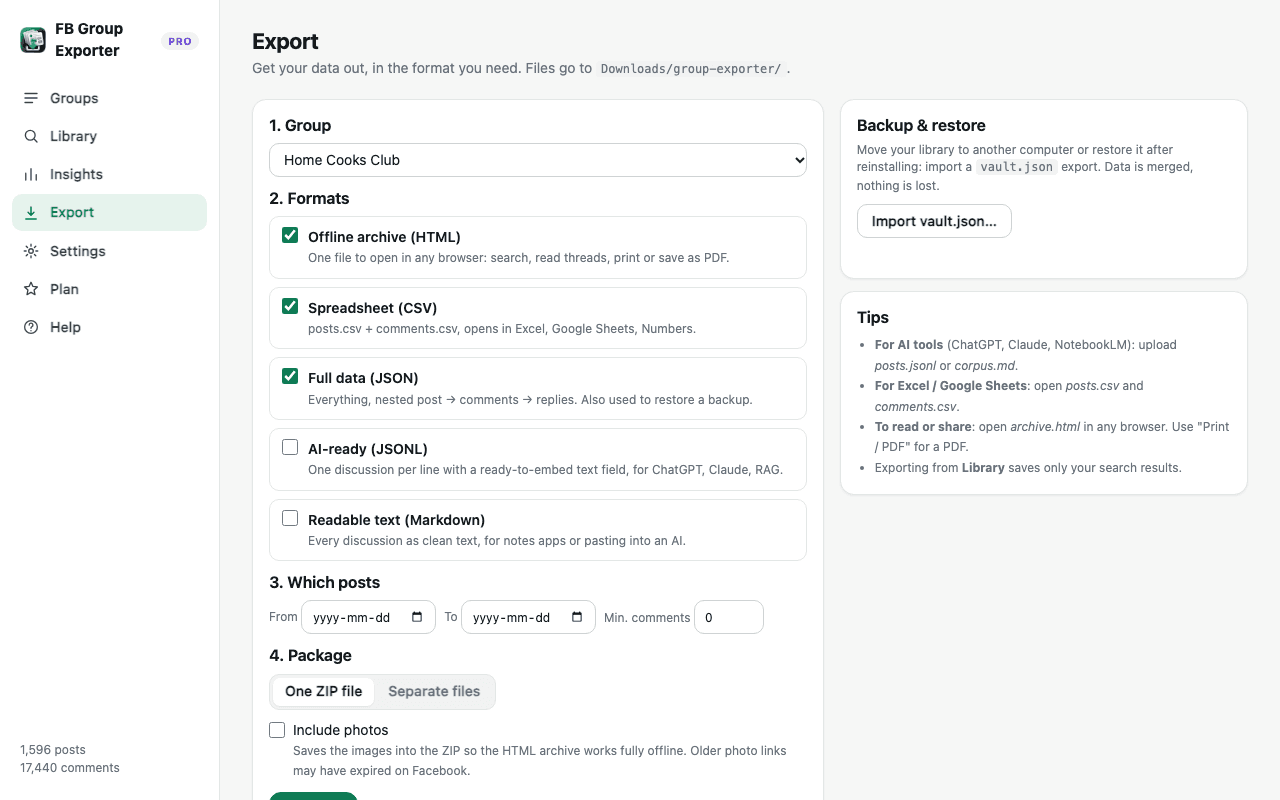
Step by step
- Download the group. Open the group on Facebook and click "Download this group" in FB Group Exporter. Photo links and Facebook's image descriptions are saved with every post.
- Open Export. In the dashboard, open Export and choose the group, plus the formats you want (the HTML archive is best for browsing photos).
- Choose ZIP with photos. Select "One ZIP file" and tick "Include photos". Chrome asks once for permission to read Facebook's image server.
- Unzip and browse. The ZIP contains a media folder with every photo and an archive.html that displays them inside their posts, fully offline.
Why photos need context
A folder of 3,000 anonymous image files is hard to use. FB Group Exporter keeps each photo linked to its post: author, date, text, reactions and the full comment thread. In the HTML archive, photos appear inline, and the search box finds posts by text, author or comment.
Facebook also generates a description for most images ("May be an image of a cake and text that says…"). These descriptions are saved and exported, so you can even search photos by their content.
Download photos soon after downloading the group
Facebook's photo links are temporary: they expire after a while. Export with "Include photos" shortly after downloading or updating the group. If some photos are missing, click "Update now" to refresh recent posts, then export again. Very old photos may no longer be available through their original links.
Formats and size
Photos are saved at the resolution Facebook serves to your browser, in their original format (usually JPEG). Large groups can produce big ZIP files. Use the date filter in Export to split the archive by year.
Photos in the ZIP are a Pro feature; the free version saves photo links and descriptions in every format.
Respect copyright and privacy
Photos belong to the members who posted them. Keep downloads for personal archiving or internal use, and ask permission before republishing anyone's pictures.
More guides
- How to export all comments and replies from a Facebook group
- How to get a Facebook group into Google Sheets
- How to export a private Facebook group you're a member of
- Facebook group analytics without admin access
- Collecting Facebook group data for academic research
- The best ways to export Facebook group posts and comments (compared)
- How to download all posts from a Facebook group
- How to export Facebook group posts and comments to Excel
- How to back up and archive a Facebook group
- Scrape Facebook group posts and comments without code
- How to save a Facebook group as a PDF
- Turn a Facebook group into an AI knowledge base