 FB Group Exporter
How to export a private Facebook group you're a member of
Most online Facebook scrapers only work with public groups, or ask for your login cookies to reach private ones, which is a real security risk. If you are a member of a private group, you can export it directly from your own browser instead, without giving your credentials to anyone.
Updated October 2026
Step by step
- Log in to Facebook as usual. Use the browser and account you normally use, the one that is a member of the private group.
- Install FB Group Exporter. Add the extension to Chrome. It never asks for your Facebook password and never sends your cookies anywhere.
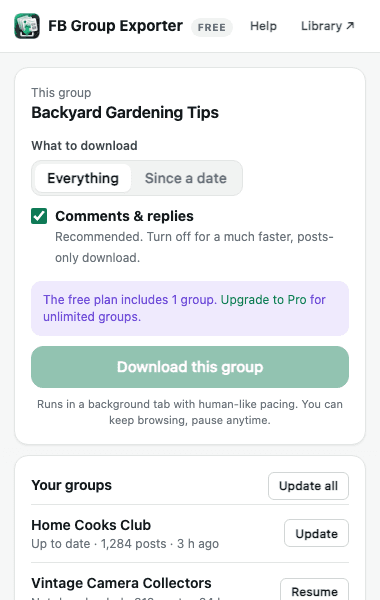
- Open the private group and download. Open the group page, click the extension icon, choose everything or a date range, and click "Download this group".
- Search and export. Your private group's posts and comments are now on your computer, ready to search and export to CSV, HTML/PDF, JSON or JSONL.
Why browser-based is the safe way for private groups
To read a private group, a tool needs to be logged in as a member. Cloud scrapers do it by asking for your password or exporting your session cookies to their servers, so a third party can act as you on Facebook, from data-center IP addresses that Facebook's security systems flag quickly.
FB Group Exporter runs inside your own browser, with your existing session. Requests come from your own computer and connection, exactly as when you scroll the group yourself. Nothing (not your credentials, not the group's content) is uploaded anywhere.
What you can export
Everything you can see as a member: posts with full text, authors, dates, reactions, photos and links, and every comment and reply. Admin-only areas (pending posts, member requests, insights) are not included unless your account can see them on the page.
Respect the group
Private groups are private for a reason. Check the group's rules, keep exported data for your own use, and ask the admins before sharing anything outside the group. Under privacy laws such as the GDPR, you may need a legitimate reason to process members' personal data.
Account safety
Downloading a group is like scrolling through it for hours. FB Group Exporter paces itself like a person, takes breaks, has a daily safety limit, and stops immediately if Facebook shows any warning or security check. Keep the default speed for very large groups.
More guides
- How to export all comments and replies from a Facebook group
- How to get a Facebook group into Google Sheets
- How to download the photos from a Facebook group
- Facebook group analytics without admin access
- Collecting Facebook group data for academic research
- The best ways to export Facebook group posts and comments (compared)
- How to download all posts from a Facebook group
- How to export Facebook group posts and comments to Excel
- How to back up and archive a Facebook group
- Scrape Facebook group posts and comments without code
- How to save a Facebook group as a PDF
- Turn a Facebook group into an AI knowledge base