
















Type "export Facebook public data to Excel" into a search engine and you get a page of connector tools promising a live feed into Google Sheets, Power BI or a Postgres table. Most of those pages were written for a Facebook that no longer exists. Between March and August 2024 Meta closed the two doors most of them relied on: the Groups API and CrowdTangle. What's left is narrower, more formal, and in some cases only open to researchers at universities and non-profits.
This guide maps what is actually still possible, using Meta's own developer and transparency documentation. It covers each kind of public data: Pages, groups, ads and public content at scale. For each one you'll see the official route, who can use it, and whether you end up with a file you can open in Excel. Where no official route exists, it says so.
Two shutdowns that changed the answer
The first was the Groups API. When Meta released Graph API v19.0 on 23 January 2024, the release notes said plainly that "the Facebook Groups API is deprecated in v19 and in 90 days will be removed from all versions". The deprecation took the permissions with it (publish_to_groups, groups_access_member_info) and the reviewable "Groups API" feature that apps used to read group content. Since spring 2024 there has been no supported developer route for reading a group's posts, whether the group is public or not. (Meta for Developers, v19.0 release notes)
The second was CrowdTangle, the free insights tool that journalists, NGOs and social media teams used for years to search public Pages and groups and download the results as CSV. On 14 March 2024 Meta told users that CrowdTangle "will no longer be available after August 14, 2024", giving five months' notice. Its page in the Transparency Center now reads, in full past tense, that CrowdTangle "was a public insights tool". The page points readers to Meta Content Library instead. (About Meta, Meta Transparency Center)
Many of the "connect Facebook public data to Excel" tutorials still ranking today were built on one of those two. If a guide tells you to paste a group ID into an API call or log into CrowdTangle, it is out of date.
Pages: yours is easy, everyone else's needs Meta's approval
Pages are the one area where the Graph API still works the way people expect, as long as you are an admin of the Page.
For a Page you manage, an app with the right Page permissions can read its posts, comments and engagement. That data can be pulled into a spreadsheet, either through your own script or through one of the many paid connectors that handle the token for you. That's the use case most of those connectors were built for, and it is still legitimate.
For anyone else's Page, Meta requires a specific feature called Page Public Content Access. Its documentation describes it as the way for an app to "read public data for Pages for which you lack the pages_read_engagement permission and the pages_read_user_content permission". In other words, it covers Pages you don't run. It comes with three hurdles:
- the feature must pass App Review before the app can read live data;
- it is "only available with business verification", and Meta warns you may have to sign additional contracts;
- the only allowed usage listed is to "analyze and/or display posts and engagement on Pages".
Until the review is approved, the app can only read Pages whose admin also holds a role on the app. In practice that rules out the quick weekend project: you need a verified business, a reviewed app, and a use case Meta accepts. (Meta for Developers, Page Public Content Access)
Groups: no API for anyone
This is where most of the searches end in frustration, because groups are where a lot of the interesting conversation happens.
With the Groups API gone, there are three ways in, and none of them is a clean export of a whole public group:
Facebook's own "Download your information" gives you a copy of what you posted in groups, not what other members wrote. Meta's export pages are explicit that the file won't include information someone else shared. We covered that export, and its gaps, in How to export your Facebook data.
Meta Content Library (more on it below) does include public groups: its scope covers posts to public "Pages, groups and events". But its downloadable subset is defined by who posted, not where. Downloads are limited to posts from Pages with 15,000 or more likes or followers, profiles with 25,000 or more followers, and verified profiles. In a typical community group nearly every post comes from an ordinary member, so for researchers those posts are view-only. (Meta Content Library documentation)
Browser-based tools read a group the way you do, through your own logged-in Facebook session, so they only work for groups you have joined and can already open. That is how our own Group Exporter for Facebook works. The free version saves one group, up to 200 posts with their comments, as an Excel workbook (XLSX), CSV, JSON or Markdown. The workbook comes with a summary sheet, a posts sheet and a comments sheet with real dates and clickable links. Pro ($24.90, one-time) removes the limits and adds the photo archive, the offline HTML archive and the members list. It's honest to add what it can't do: it doesn't reach groups you aren't in, and it isn't a firehose across thousands of groups. For a side-by-side of all the options, including cloud scrapers and the risks of handing over your session cookie, see our guide to the best way to export Facebook group data.
Meta Content Library: the real replacement, but not for marketers
Content Library is what Meta built to replace CrowdTangle, and on paper it is far broader. Its documentation describes "comprehensive access to the public content archive" across Facebook, Instagram, Threads and WhatsApp channels, in two forms: a web interface and an API that runs inside a secure "cleanroom".
The catch is who can use it. To be eligible, applicants "must be affiliated with a qualified academic institution or a qualified non-academic research institution". For a university, that means accredited, degree-granting and not-for-profit. For any other organization, it means a not-for-profit "whose primary purpose or core activity is to conduct scientific or public interest research". A brand, an agency or a freelance analyst does not qualify, however good the project. (Meta for Developers, Get access)
If you do qualify, here is what the process and the limits look like, according to Meta's documentation:
| What Meta's documentation says | |
|---|---|
| Who reviews applications | The Secure Data Access Center (CASD), independently of Meta |
| How long it takes | Usually 2 to 3 weeks for CASD's review, then another 2 to 3 weeks of processing at Meta |
| Price | No fee for the web interface or for the API in Meta's own Secure Research Environment. The alternative, ICPSR's SOMAR enclave, has charged US$371 a month per team since January 2026, plus a US$1,000 one-time fee for new projects |
| CSV download | Only for the "downloadable subset": Pages with 15,000+ likes or followers, profiles with 25,000+ followers, verified profiles |
| Download limits | Up to 10 CSV files a day, up to 100,000 search results per file |
| Raw data out of the API environment | Not permitted on either platform (Meta's environment or SOMAR); only reviewed outputs such as code, charts and statistics leave |
That last line is the one that surprises people coming from CrowdTangle. The API is designed so that the analysis happens inside the secure environment, and what you take home is your results, not the dataset. The web interface's Download CSV button is the exception, and it only covers the high-follower slice described above. (Content Library, computing platform comparison)
For an academic team studying public debate on big Pages, that is a workable deal. For a social media manager who wants last month's posts from ten competitor Pages in a spreadsheet, it is a dead end.
Ads: the most open route of all
Oddly, the most accessible official dataset is about advertising. The Ad Library API lets anyone with a Facebook account search two categories of ads:
- ads about social issues, elections or politics delivered anywhere in the world during the past seven years;
- ads of any type delivered to the UK or the European Union during the past year.
To use it you confirm your identity and location at Facebook.com/ID, which "can take a few days", then create a Meta for Developers account and an app. Political and issue ads come with spend and impression ranges and demographic breakdowns. Ads delivered in the UK and EU come with estimated reach figures, plus advertiser and payer information in the EU. (Meta Ad Library API)
Two limits are worth knowing before you start. Ordinary commercial ads shown only outside the UK and EU are not in the API at all. You can browse them on the Ad Library website, but not query them. And Meta notes that "you cannot currently download a batch of archived ads", so the creatives themselves come one at a time. The API returns JSON, so getting it into Excel means a small script or a JSON import step. Excel's Power Query and most spreadsheet add-ons can do that.
From any of these into Excel or Google Sheets
Whichever route you end up on, the last mile is the same, and it is where people lose the most time.
If you get JSON (Graph API, Ad Library API), flatten it before you open it. Nested fields like reactions or demographic breakdowns become one column per value. Excel's Get Data > From JSON does this through Power Query. In Google Sheets you'll need Apps Script or an add-on.
If you get CSV (Content Library downloads, most export tools), open it through an import step rather than double-clicking. Excel may misread dates and long numeric IDs on a double-click: a Facebook post ID can lose its last digits when Excel treats it as a number. Importing with the ID column set to Text avoids that.
If you get XLSX, you can skip both steps. That is why we added the Excel workbook to the free plan of Group Exporter: dates stay dates, IDs stay text, and links stay clickable.
And whichever source you use, the data is about real people. Even in a public group, members may not expect their posts to end up in a spreadsheet. Pseudonymize names before sharing a file, and keep only the columns your project needs.
The short version
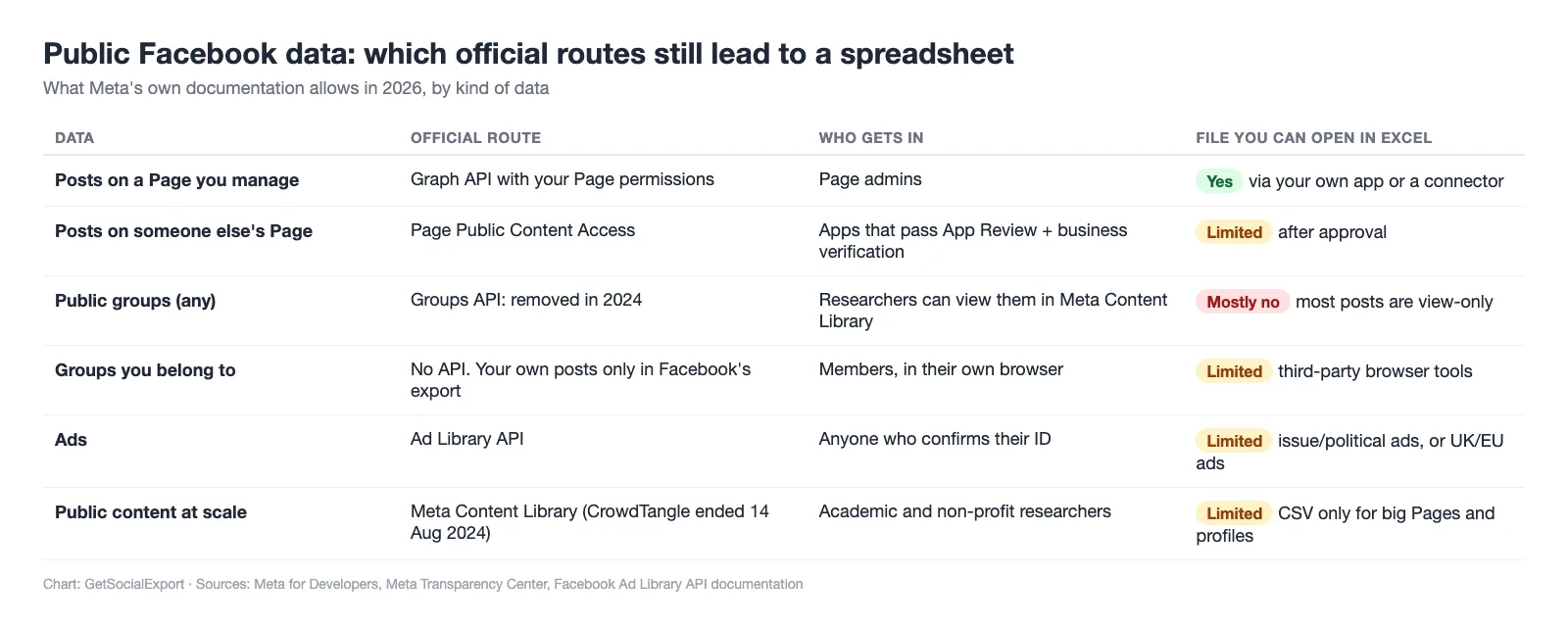
If the data is your own Page, use the Graph API or a connector built on it. If it's someone else's Page, budget for business verification and App Review. If it's ads, the Ad Library API is open to anyone willing to confirm their ID. If it's public content at scale, Meta Content Library is the only official door, and only researchers at academic and non-profit institutions can use it. If it's a group, there is no API left, and the realistic options are your own posts from Facebook's export or a browser tool for groups you belong to, such as Group Exporter.
More step-by-step walkthroughs are in our guides.