


















You open Teams with your new account and the chat list is empty. The colleague you messaged every day, the thread with the client, the group chat where the project was planned: none of it came with you. The same thing happens when you add a work account next to a personal one, or when two companies merge and IT moves everyone into one tenant.
The short answer is that Microsoft Teams almost never moves chat history from one account to another. That isn't a missing setting you haven't found. Microsoft's own documentation says so, case by case, and the reason lies in how Teams stores a conversation. There is one real exception, a few admin-level routes, and a couple of ways to keep a copy you can read. This article goes through each situation as Microsoft describes it in November 2026.
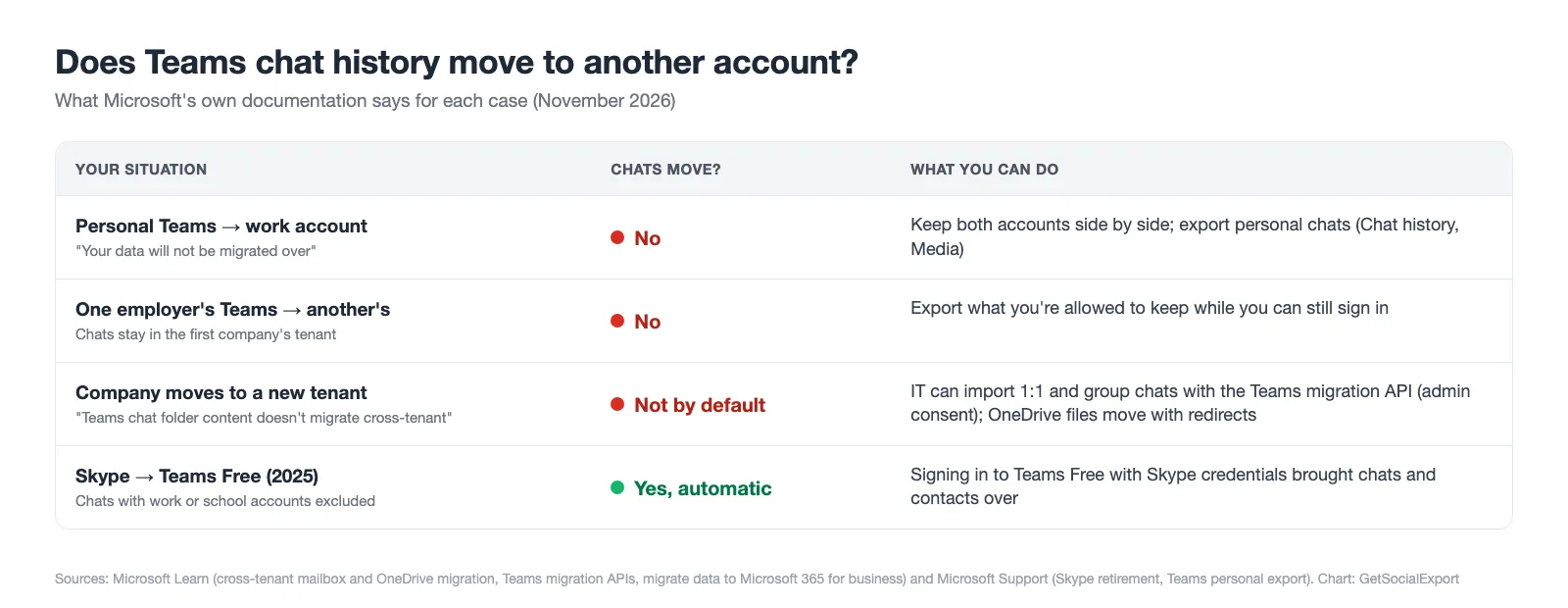
Which chats move, at a glance
| Your situation | Does the chat history move? | What Microsoft says | What you can do |
|---|---|---|---|
| Personal Teams account → new work account | No | "When you start using Teams with your new work account your data will not be migrated over" | Keep both accounts signed in side by side, or export the personal chats |
| Work account at one company → work account at another | No | Chats stay in the first company's Microsoft 365 tenant; the export APIs are for admins only | Export what your employer allows you to keep while you still have access |
| Your company moves to a new tenant (merger, acquisition, rebrand) | Not with Microsoft's mailbox migration | "The Teams chat folder content doesn't migrate cross-tenant" | IT can import chats with Microsoft's Teams migration API or a migration tool |
| Skype → Microsoft Teams Free (2025) | Yes, automatically | "Your chats and contacts will automatically transfer to Teams Free" | Already done for people who signed in to Teams Free in time |
Why a chat doesn't follow your account
A Teams chat isn't a file that belongs to you. Microsoft keeps the messages in its cloud chat service, inside the Microsoft 365 organisation (the "tenant") where the account lives, and it stores a compliance copy in a hidden folder of each participant's Exchange mailbox. Files you send in a chat go to your OneDrive, and channel files go to the team's SharePoint site. We mapped every one of those locations in where Microsoft Teams chats are stored.
Two things follow from that. A new account is a different identity, often in a different tenant, so it starts with no conversations of its own. And there is no "export my chats and import them elsewhere" button for ordinary users, because the tools that read and write chat history in bulk are built for administrators. The Teams Export APIs need a permission that "only an administrator can approve", and the import API described further down is application-only with admin consent.
From a personal Teams account to a work account
Plenty of people start with Teams for personal use (the free version, on teams.live.com) and later get a work or school account from an employer or their own new business. Microsoft's page on moving data to a Microsoft 365 business subscription explains how to bring across OneDrive files, email and calendar. For Teams chats, the answer is one sentence: "When you start using Teams with your new work account your data will not be migrated over."
Microsoft's suggested workaround is to keep using both. Its advice is to "open your old Teams account and new work account side by side" from the profile picture in the top right corner of Teams. Contacts don't come across either: you add each person again by email address. Meetings have to be recreated in the new account's calendar.
Your personal chats aren't deleted when you add the work account. Microsoft says the data in a personal account "won't expire" once you create the business one. So "transferring" in this case really means keeping the old account available, and taking a copy of anything you want to keep in a file.
For that copy, Microsoft offers an export for personal accounts. Its export page for Teams for personal use lets you request your "Chat history, Media, or both". Your call log comes with them. The export isn't instant: you check back on the page until a download link appears under Available Exports. It only covers personal accounts. Work and school accounts have no equivalent self-service export.
From one employer's Teams to another
This is the case behind most searches for "transfer Teams chat history", and the answer is the bluntest. Chats in a work account sit in that company's tenant and belong to the company, not to the account holder. When you join a new employer, your new account lives in a different tenant, and nothing links the two.
No user-facing tool moves chats between companies, and the admin tools wouldn't apply either: the old company's IT team has no reason, and often no right, to copy its internal conversations into another organisation. If there are messages you are entitled to keep, such as your own notes, handover details or personal conversations with colleagues, the only window is while you can still sign in. Our guide to saving your Teams chats before you move on covers that step by step, including what to check in your employer's policy first. What happens to the old account afterwards is in how long Microsoft Teams keeps your chats.
When your whole company moves to a new tenant
Mergers, acquisitions, divestitures and rebrands often end with users moving from one Microsoft 365 tenant to another. Here the question goes to IT, and the details matter, because Microsoft's own migration tool leaves Teams chats behind.
Microsoft's cross-tenant mailbox migration moves a mailbox's email, contacts, calendar, tasks and notes between tenants. It needs a paid Cross Tenant User Data Migration licence for each user (a one-time fee, assigned on the source or target user). Its FAQ answers the Teams question directly:
Does the Teams chat folder content migrate cross-tenant? No, the Teams chat folder content doesn't migrate cross-tenant.
The same FAQ adds that after the move, that content "is available for source tenant administrator to search and export, using a content search". In other words, the compliance copy stays searchable on the old side for administrators. It doesn't show up in anybody's chat list on the new side. Teams meetings move with the calendar, but Microsoft warns that "the meeting URL isn't updated", so they have to be removed and recreated in the target tenant.
Files fare better. Cross-tenant OneDrive migration moves a user's OneDrive, which includes the "Microsoft Teams Chat Files" folder, and leaves redirects behind. "Anyone clicking on a shared link to the old location is redirected to the new one, provided they still have access to the destination," until the source tenant is shut down.
To bring the conversations themselves, an organisation has to import them. Microsoft Graph has a set of migration APIs for Teams that put a chat or channel into "migration mode" and write historical messages into it. Microsoft lists "1:1 and group chat messages" as in scope, along with the original message time, reply chains, inline images, @mentions, emojis and up to 250 reactions. The limits are real, though. The permission (Teamwork.Migrate.All) is application-only and needs admin consent. "Federated content can't be imported." Videos are out of scope. And the work of extracting, mapping and converting the old messages is up to whoever runs the project, which is why companies usually hand it to a migration vendor.
If your company is going through this, the useful question for IT is specific: "Does the migration include Teams 1:1 and group chats, or only mailboxes, OneDrive and teams?" If the answer is the latter, export anything you need from the old tenant before your account there is switched off.
The one move that happened automatically: Skype to Teams Free
There is one case where Microsoft did move chat history to another app on its own. When it retired Skype on 5 May 2025, Skype users could sign in to Microsoft Teams Free with their Skype credentials, and "your chats and contacts will automatically transfer to Teams Free". Microsoft said the sync should take less than a minute.
Even this transfer had exceptions. According to the same page, chats between Skype users and Teams work or school accounts were not migrated. Neither were chats with yourself, Skype's private conversations, or chats with Copilot and bots. People who didn't move in time had a deadline: Microsoft says that unless you used Skype and then Teams Free within its stated window, "your data will be completely deleted after June 15th 2026". That date has passed, so for most people who never signed in, the Skype history is gone.
Keeping a copy you can read
Since chats rarely move, the practical goal is usually different: a copy of the conversations you need, in a file that doesn't depend on any account. You can't import that file back into Teams as a live chat (only the admin migration APIs write chat history), but you can read it, search it, print it and share it.
For a personal account, Microsoft's own export, described above, is the place to start. For a work or school account, there is no self-service export from Microsoft, and the admin route (eDiscovery or the Export APIs) depends on your IT department.
That gap is why we built Chat Exporter for Teams, a Chrome extension that saves your own chats from Teams on the web. It works with work and school accounts on teams.microsoft.com and personal accounts on teams.live.com. It reads only the chats your account can already open in the browser, through the tab you are signed in to, so it needs no admin rights and no password. Open the chats you care about in Teams, click Load my chats in the extension, pick the chats and Load messages, then Export selected. It saves every message Teams has already loaded on your computer, so for very old messages, scroll up in the chat first so Teams loads them.
The free version exports one chat at a time, with its latest 100 messages, as CSV or text. Pro costs $27.90 once and adds every loaded message, several chats in one export, PDF and HTML with the date and time of each message and a SHA-256 fingerprint, JSON, and a ZIP with the pictures shared in the chat. It installs from the download page, and our guides cover PDF and Excel exports in detail. It is a way to keep a readable record. It doesn't move chats into another account, and nothing available to ordinary users does.
One last check before you export work chats: your employer's policy decides what you may keep, especially when the chats contain other people's personal data or confidential business information.
The pattern behind all of this
Put the cases side by side and the logic is consistent. Teams treats a conversation as data held by an organisation, attached to the identities in that organisation, not as something an individual carries from account to account. The only automatic transfer Microsoft has made, from Skype, happened because Microsoft was retiring one consumer service and moving its users to another. Everywhere else, history moves only when an administrator imports it, and otherwise it stays where it was written. If a conversation matters to you, save a copy while you can still open it.