


















When the University of Waterloo switched on its new Microsoft Teams rule on August 19, 2025, it warned staff what they would see: a line at the top of their chats reading "We've deleted older messages due to your organization's retention policy." Every chat message older than 90 days would go, and it "will not be recoverable."
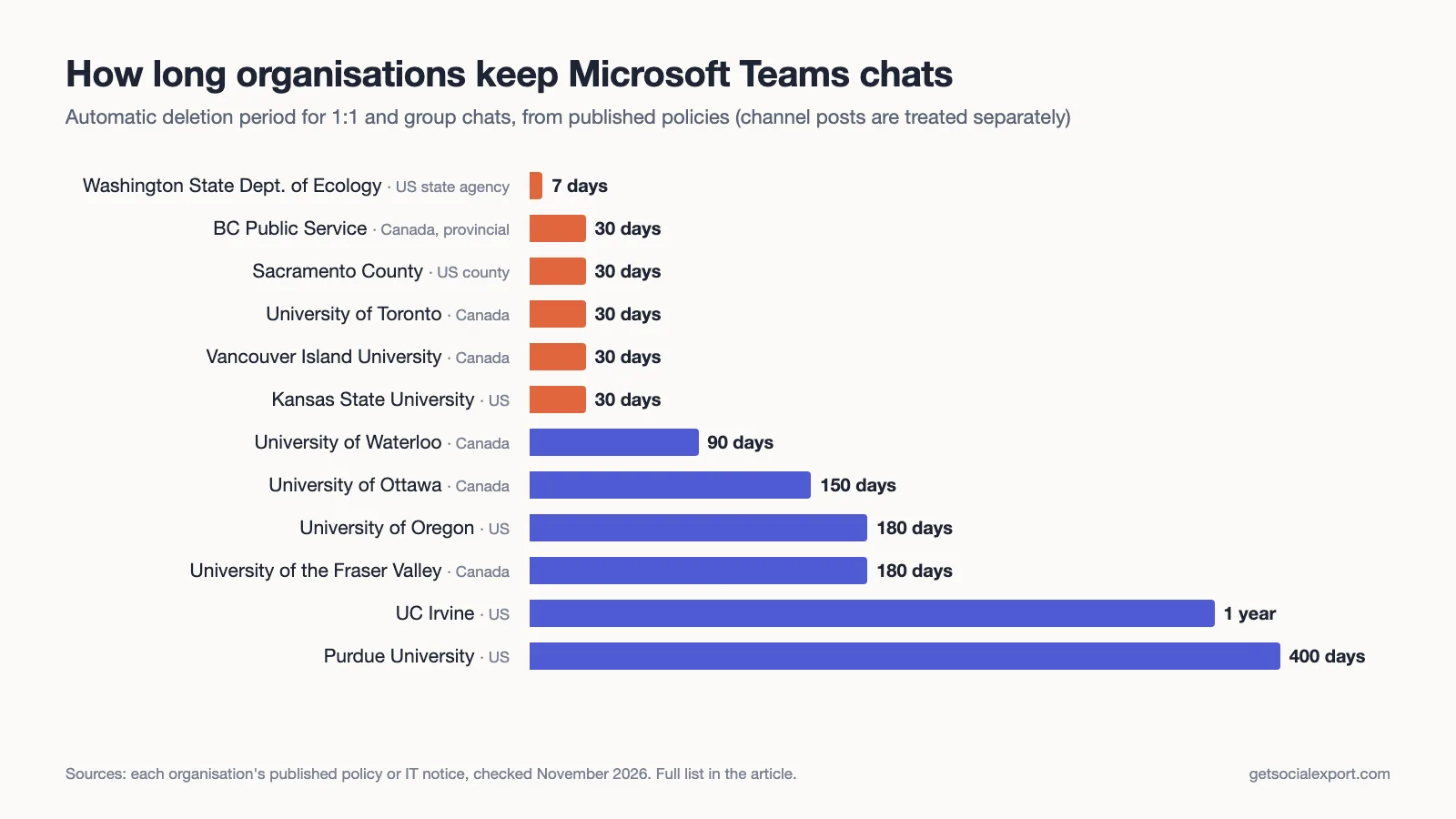
That banner is the honest answer to a question people type into search engines every day: how long does Microsoft Teams keep my chats? Teams itself has no fixed limit. Your organisation picks one, and the range is enormous. We read the published policies of a dozen universities and public bodies and found chat histories being wiped after anything from seven days to 400 days, with 30 days the most common choice.
This article covers what Microsoft does by default, what organisations actually choose (with sources), what "deleted" really means behind the scenes, and what you can do if a conversation matters to you.
The short answer
- Personal Teams (the free version, teams.live.com): no automatic deletion. Your chats stay until you delete them or your Microsoft account is closed.
- Work or school Teams, no retention policy configured: chats are kept indefinitely. Nothing expires on its own.
- Work or school Teams with a retention policy: chats are deleted after whatever period your IT or records team set. In the published policies below, that ranges from 7 days to 400 days.
- Channel posts are almost always treated differently from chats, and usually kept far longer.
If you see the "We've deleted older messages" banner, your organisation has a deletion policy. The age of the oldest message still visible in a busy chat is a decent clue to its length.
Microsoft's default: keep everything
Out of the box, Teams doesn't throw away messages. In Microsoft's documentation, deletion is something an administrator has to set up with a retention policy, for when "you need to delete Teams messages for compliance reasons." Until someone does, chats don't expire. Two public bodies put it plainly when they changed course. British Columbia's Chief Records Officer wrote in a 2021 memo that Teams had been rolled out across government in April 2020 with no retention or deletion policies, so "all chat records were retained indefinitely." The University of Ottawa said almost the same thing in December 2023.
Both notices tell the same pandemic-era story: Teams was switched on in a hurry in 2020, the records-management conversation was skipped, and it only came back once years of informal chat had piled up. Several of the policies in the table below date from that catch-up period.
What organisations actually choose
We looked for organisations that publish their Teams chat retention period on a public page, and kept only those where we could read the primary document ourselves. Here is what they say about one-to-one and group chats.
| Organisation | Chats deleted after | In force since | Channel posts | Source |
|---|---|---|---|---|
| Washington State Dept. of Ecology (US) | 7 days | before Sept. 2023 | No default deletion | Ecology staff bulletin, Sept. 27, 2023 |
| BC Public Service (Canada) | 30 days | May 31, 2021 | Kept until deleted | Chief Records Officer memo |
| Sacramento County (US) | 30 days, no extension | Policy 6-3104 | 2 years | County policy |
| University of Toronto (Canada) | 30 days | Oct. 1, 2024 | Not affected | EASI notice |
| Vancouver Island University (Canada) | 30 days | Not stated | Not affected | VIU IT knowledge base |
| Kansas State University (US) | 30 days | Not stated | 365 days | K-State retention schedule |
| University of Waterloo (Canada) | 90 days | Aug. 19, 2025 | Not affected | Waterloo notice, July 9, 2025 |
| University of Ottawa (Canada) | 150 days | Jan. 30, 2024 | Kept until deleted | uOttawa news |
| University of Oregon (US) | 180 days | June 30, 2021 | Not stated | UO Records Management |
| University of the Fraser Valley (Canada) | 180 days | Dec. 31, 2021 | Not affected | UFV announcement |
| UC Irvine (US) | 1 year | Dec. 20, 2024 | Not stated | UCI OIT notice |
| Purdue University (US) | 400 days | Oct. 10, 2025 | Not affected | Purdue IT newsroom |
A few things stand out.
Thirty days is the default answer. Five of the twelve settled on it, including the whole BC public service and every employee of Sacramento County, where the policy adds that there is no option for extended retention. Records managers like 30 days because it covers a typical "what did we agree last week?" lookup and little else.
Governments go shorter than universities. The two shortest periods belong to public bodies. Washington's Department of Ecology told staff that WaTech, the state's IT agency, had set chats to delete after seven days, and that chats were "meant to be transitory in nature." Universities cluster between 90 days and a year, partly because a semester is long. Ottawa chose 150 days because it is "equivalent to one semester."
Not every organisation deletes. Michigan State University's IT knowledge base says that by default its Teams chat messages "will always remain visible," with shorter retention available on request. And Johns Hopkins shows that these policies can be reversed. In July 2026 the university announced that chats would be deleted after 90 days from October 15; an editor's note on the same page says that on July 29, responding to user feedback, Johns Hopkins IT decided the deletion initiative "will not move forward at this time." We left Johns Hopkins and Michigan State out of the chart because neither currently deletes chats on a fixed schedule.
Some policies reach beyond Teams. UC Irvine's one-year rule also covers Google Chat and Zoom chat. Oregon's applies to Teams, Zoom and Skype for Business. Vancouver Island University's 30-day rule explicitly includes bot chats and Microsoft 365 Copilot interactions.
A caveat on the data: this is a sample of organisations that publish their rules, not a survey of every Microsoft 365 customer. Public institutions are over-represented because they are the ones that announce such changes in public. Most private companies never publish their setting at all.
Why organisations delete chats at all
The reasoning in these notices is remarkably consistent, and it comes from records management rather than IT.
The core idea is the transitory record: information with short-term value, like a phone call or a hallway conversation. Records schedules generally let organisations discard transitory material once it has served its purpose. Several institutions frame Teams chat that way. BC's memo says automatic deletion "should avoid the need to 'hold' transitory information unnecessarily." Waterloo puts it more bluntly: chat messages "are not intended to be kept."
Then there is risk. Every message an organisation stores can be requested, searched and produced. Washington's Ecology bulletin reminds staff that chats are subject to public records requests, litigation discovery and internal investigations, and tells them to "assume anything you put into Chat, including memes and stickers, may be viewed by the public." Data that no longer exists cannot leak in a breach either, which UFV listed among its reasons, alongside storage costs.
The catch is spelled out in both the BC and Ottawa notices: it is "the content of a chat message that determines whether it is transitory and not the form." A decision, an approval or a complaint made in a chat can be a real record. Deleting chats on a timer works only if people move the important parts somewhere permanent first, and that is exactly the step people forget.
What "deleted after 30 days" means behind the scenes
The visible part is simple: after the retention period, messages disappear from the app. The back end is more involved, and it explains a few things that confuse users. All of this comes from Microsoft's documentation, Learn about retention for Teams.
Teams keeps messages in an Azure-based chat service. For compliance, it also copies every chat message into a hidden folder in the Exchange mailbox of each person in the chat; channel messages go to the team's group mailbox. Retention policies work on those mailbox copies.
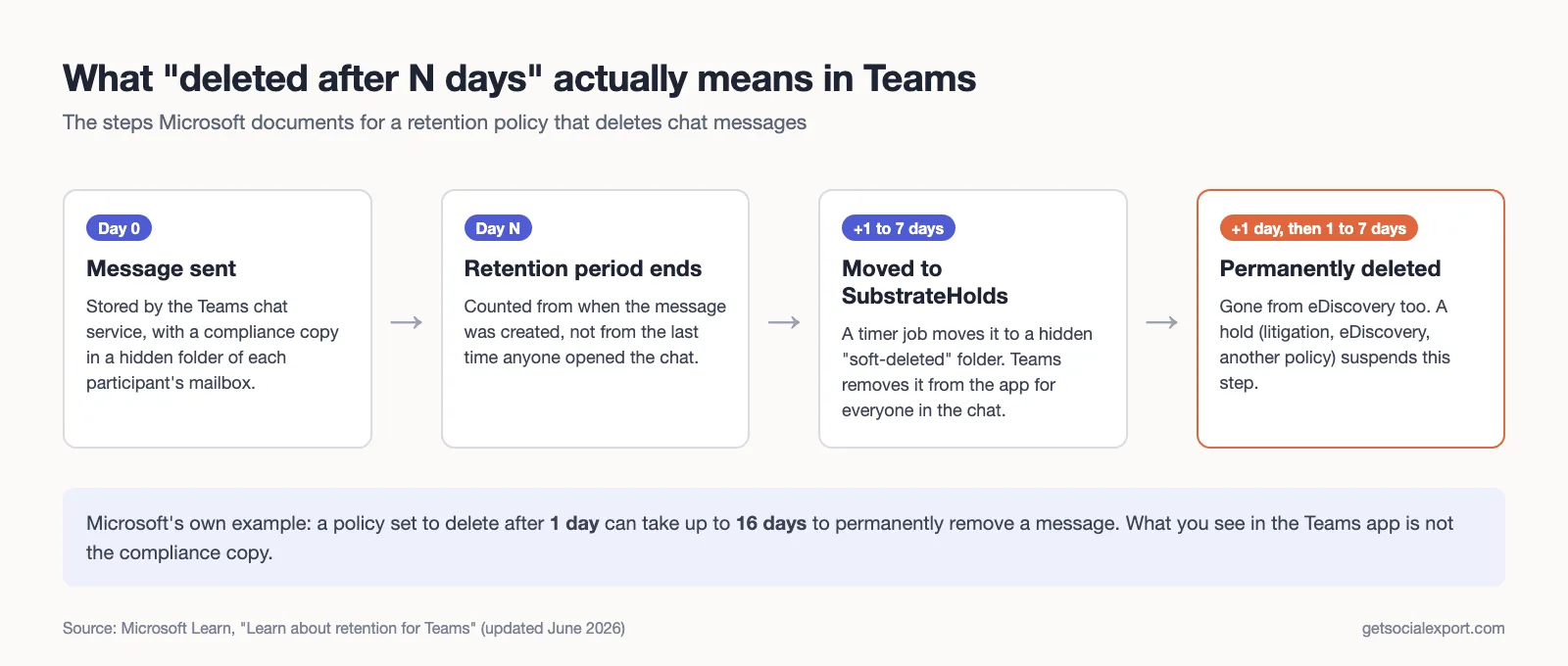
When a message passes its retention period, an Exchange timer job (which Microsoft says "typically takes 1-7 days to run") moves it to a hidden folder called SubstrateHolds. At that point Teams is told to delete it, and it vanishes from the app. It stays in SubstrateHolds for at least one more day and is permanently deleted the next time the job runs. Microsoft's own example: a policy set to delete after one day can take up to 16 days before the message is gone for good and no longer shows up in eDiscovery searches.
Three consequences are worth knowing.
The clock starts when the message is sent. Retention is based on the creation date, not on when the chat was last active. A two-year-old thread that someone replied to yesterday still loses everything older than the cutoff.
Holds keep a copy you can't see. If a mailbox is on litigation hold, eDiscovery hold or another retention policy that keeps data, Microsoft says messages "will no longer be visible in the Teams app but will continue to be discoverable with eDiscovery." So "gone from my screen" and "gone" are not the same thing. Your employer may still be able to produce a message you can no longer read.
The strictest organisation in the chat wins, on screen at least. When a retention policy deletes a message, Teams removes it "for all users in the conversation," including people from another organisation with a longer policy or none at all. Microsoft has a troubleshooting article for exactly this surprise. UC Irvine warns its staff about it directly: if anyone in a chat has a more restrictive policy, that shorter period applies. If you chat with a partner organisation that deletes after 30 days, your side of the conversation disappears from view after 30 days too, even if your own employer keeps everything.
A few other details from the same documentation: files shared in a chat aren't covered by Teams chat retention (they live in the sender's OneDrive and follow its rules, which is why several of the notices above tell staff their shared files won't be touched). Code snippets, voice memos recorded in the mobile app, and other people's emoji reactions aren't kept by retention at all. And when you delete one of your own messages, it disappears from the app right away but isn't moved to SubstrateHolds for 21 days.
When you leave the organisation
Leaving a job or graduating is when most people discover how little control they have. Once your work or school account is disabled, you lose access to Teams, and with it every chat. What happens to the data afterwards depends on your former employer. If a retention policy that keeps Teams messages covers you, Microsoft says your mailbox becomes an inactive mailbox and the chats remain searchable by the organisation's compliance team. Without one, the data is eventually deleted with the account. Sacramento County's policy, for example, keeps a terminated employee's mailbox for 90 days unless a department asks for an extension.
The other people in your chats keep their copies, subject to the same retention rules. You don't.
Microsoft gives ordinary work and school users no built-in "export my chats" button; exports of organisational Teams data are an admin and compliance function. If you're planning a move, read our guide on exporting Teams chats before leaving a job, and do it before your last day, not after.
Personal Teams is a different story
The free, personal version of Teams (on teams.live.com, signed in with a personal Microsoft account) has no organisation and so no retention policy. Chats stay until you delete them.
The main way to lose them is to lose the account. Microsoft's account activity policy says it may close Microsoft accounts that haven't been used for two years. Microsoft also offers an official export for personal Teams: you request it on the export page, wait for it to be prepared, and download an archive containing your messages as a JSON file, which is complete but not pleasant to read.
How to find out your own organisation's rule
- Look for the banner. "We've deleted older messages due to your organization's retention policy" at the top of a chat means a deletion policy is active.
- Check the oldest message in a long-running chat. If nothing is older than roughly a month, or roughly a year, you have your answer.
- Search your intranet or IT help site for "Teams chat retention." Many organisations publish it, as the table above shows.
- Ask IT or your records manager. They can also tell you whether channel posts follow a different rule, which they nearly always do.
Keeping what matters
If your organisation deletes chats, the official advice in almost every notice we read is the same: move anything that is a real record to a channel, a SharePoint site or your organisation's records system. That is the right answer for work decisions, and it keeps the information where colleagues can find it.
Sometimes you need your own copy: a disagreement with a manager, a harassment complaint, proof of an agreement, or simply years of conversations with a colleague you won't work with again. Copying and pasting a long thread is slow and loses dates and names. That is the gap our Chat Exporter for Teams was built for. It is a Chrome extension that reads your own chats in the Teams web app (work, school or personal accounts) and saves them as PDF, Excel/CSV, text, HTML or JSON, with no admin rights needed. It can also produce a dated PDF with a SHA-256 fingerprint, which helps show the file hasn't been altered since export; our guide on saving a Teams chat as evidence explains how. It can only export what is still visible to you, so it works before a retention policy removes messages, not after.
One caution: work chats belong to your employer, and some organisations restrict copying them. Check your acceptable-use and records policies before exporting work conversations, and treat other people's messages with care.
A final word on retention
Teams doesn't forget anything on its own. People do the forgetting, through a setting someone in IT chose, usually for good reasons, often with a short notice that most staff skimmed. If you rely on chat history, find out what your setting is now, while there is still something to save.