









Most questions about Instagram privacy come down to one worry: will they know? Will the person you unfollowed get a notification? Can a cousin tell you dropped them from Close Friends? Does someone find out you took a screenshot?
Instagram answers most of these in its Help Center, but the answers are spread over dozens of short pages, and some of the advice repeated online no longer matches them. We read the current pages one by one in November 2026 and put the answers in one place. Each answer below links to Instagram's own wording, and where the Help Center says nothing, we say so instead of guessing.
The short answer
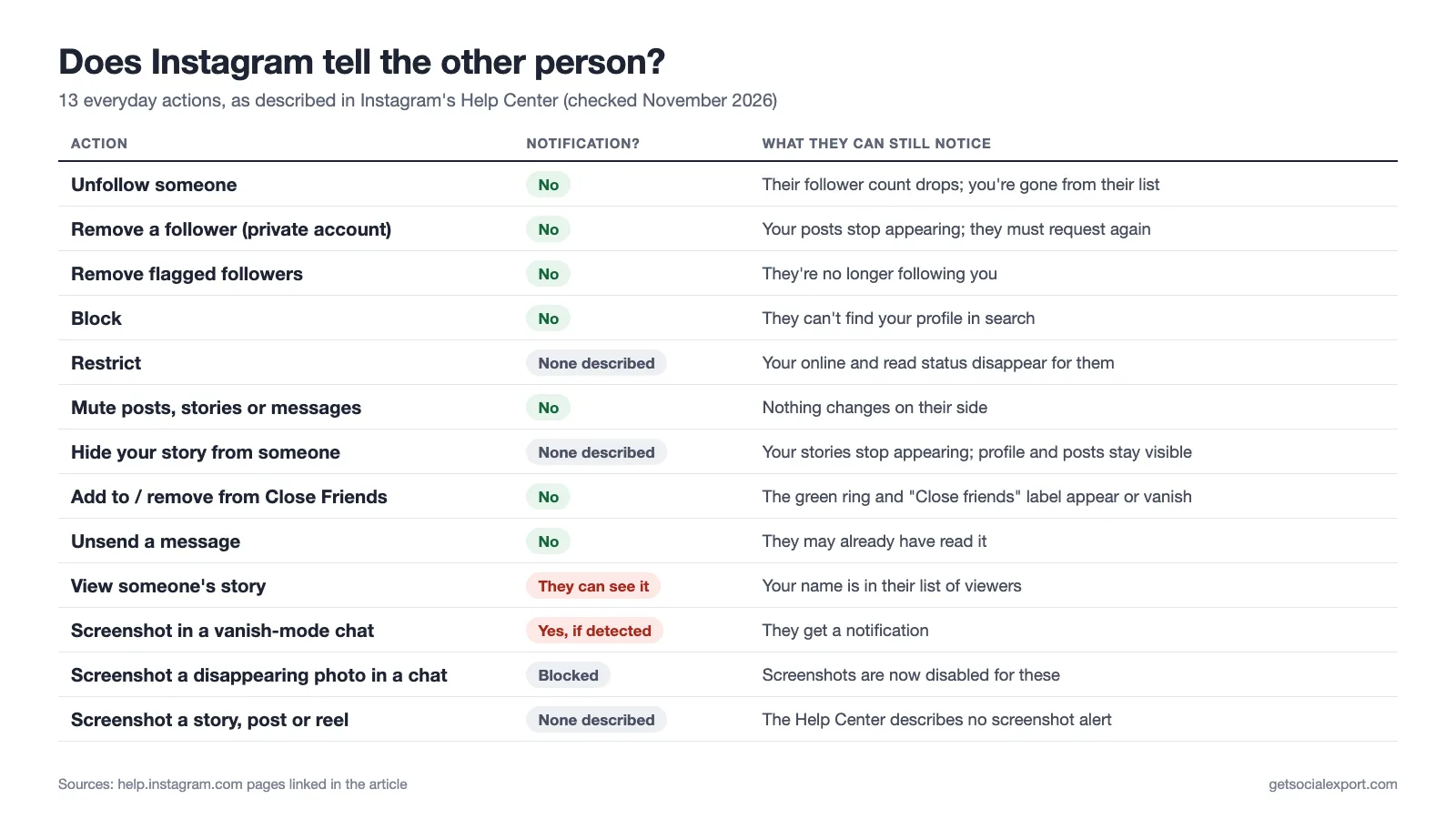
Instagram almost never announces what you do to someone else's account. Unfollowing, removing a follower, blocking, muting, and adding or removing someone from Close Friends happen silently. The exceptions are the ones that involve something the other person sent you or shared with you. They can see that you viewed their story, and in a vanish-mode chat they get a notification if Instagram detects a screenshot.
Silent doesn't mean invisible, though. Most of these actions leave a trace that the other person can find if they go looking. A follower you removed no longer sees your posts. Someone you blocked can't find your profile when they search for it. The chart at the top of this page separates the two questions: does Instagram tell them, and can they work it out anyway?
Following and followers
Unfollowing someone
Instagram's Help Center puts it plainly: "People won't be notified when you unfollow them." Their profile shows Follow instead of Following on your side, and that is the only immediate change.
What they can still notice is the result. Their follower count goes down by one, and your name is no longer in their followers list. Most people never check a list that long by hand, which is exactly why "who unfollowed me" tools exist. More on that below.
Removing one of your followers
You don't have to unfollow someone to cut the link. You can remove them as a follower, and "they aren't notified that you've removed them." There is a condition that often goes unmentioned: this option is for accounts set to private. On a private account, the person you removed stops seeing your posts in their feed. If they open your profile, they'll find they have to request to follow you again.
Public accounts have a narrower version. Instagram now flags followers it considers likely spam, bots or irrelevant, and lets you remove them in bulk from a Flagged for review notice in your followers list. According to the Help Center page on unwanted followers, those accounts "won't be notified that they've been removed from your followers." The same page says that, by default, new follows from flagged accounts arrive as requests even on a public account. Requests you don't approve within 30 days are declined automatically.
Blocking, restricting and muting
These three tools are often mixed up, and they leave different traces.
Blocking
"People aren't notified when you block them." What changes for them is substantial, though. A blocked person "can't see your photos or videos or search for your Instagram account," according to the unfollow page, which also covers blocking. A block made from the app can extend to other accounts the person already has and to new ones they create. If you're both in a group chat, Instagram asks whether you want to stay. If you do, you'll still see each other's messages there.
So a block is silent, but it's the action most likely to be noticed. Someone who searches for you and finds nothing will usually draw the right conclusion.
Restricting
Restrict was designed for situations where blocking would escalate things. The Help Center's page on restricting describes what the restricted person loses. They "won't be able to see when you're online or if you've read their messages." Their new comments on your posts are visible only to them, unless you approve them. Their messages move to your Message Requests, where you can read them without them knowing you've seen them.
The page doesn't describe any notice sent to the restricted person. In practice, the effect is designed to be hard to spot: their comments still appear to them, so from their side little seems to change.
Muting
Muting is the quietest of all. You can mute someone's posts, their stories, or their messages, and "Instagram won't let them know you muted them." You still follow each other. Nothing about your profile changes from their point of view. Muting doesn't cover their notes: those still appear unless you mute notes separately.
Stories
Viewing someone's story
This is the clearest case where the other person does find out. Instagram's page on the subject is a single sentence: "When you see someone's story, they'll be able to tell that you've seen it." Your username appears in the story's list of viewers. The Help Center offers no way to watch a story without appearing in that list.
Hiding your story from someone
You can hide your story and live videos from specific people, either from your settings or straight from the list of people who viewed a story. The Help Center doesn't mention any notification. It does point out that hiding your story "doesn't prevent them from seeing your profile and posts," so it's not a substitute for a block.
Close Friends
"People won't be notified when you add or remove them from your list." Being on the list isn't secret, though. People on your Close Friends list see a Close friends label on stories, notes and reels you share with the list, and may see a green ring around your profile photo. Someone who used to see that green ring and no longer does can draw a conclusion. Nobody can ask to be added, and if someone on the list likes, comments on or shares a reel you shared with Close Friends, the others on the list can see who did it.
Messages and screenshots
Unsending a message
Unsending removes a message for everyone in the chat, but Instagram is honest about the limit: "the people you sent it to may have already seen your message." Two details are easy to miss. Unsent messages aren't included in your own Download your information file, but if the chat is reported, unsent messages "could also be included in the report."
Screenshots: where Instagram tells, and where it doesn't
The screenshot question is where outdated advice is most common. According to the current Help Center:
- Vanish mode chats: if someone takes a screenshot of a message in vanish mode, "you'll receive a notification if we detect they take a screenshot." Note the wording: if we detect. The same page reminds you that anyone can photograph their screen with another device, and that vanish mode may be unavailable in Japan and in European countries.
- Disappearing photos and videos in chats: Instagram's page on these now says that "taking a screenshot is now disabled for a disappearing photo and video you've sent in a chat." The sender can still see whether the photo or video was seen.
- Stories, posts, reels and ordinary chat messages: the Help Center describes no screenshot notification for any of them.
Can anyone see who viewed their profile?
Instagram's Help Center describes no feature that lists the people who visited your profile. Apps that claim to show "profile stalkers" have no official source for that information, and Instagram warns about the category. Its page on accounts restricted for data scraping lists giving "your username and password to a third-party app or website" as one of the reasons an account can be flagged. A separate page on securing an account says that apps you hand your login to "can gain complete access to your account."
The same warning applies to most "unfollower" apps that ask you to log in through them.
How people actually find out who unfollowed them
Because Instagram never sends an unfollow notification, there's only one way to know: compare your followers list at two different moments. The people in the first list who are missing from the second unfollowed you, deactivated their account, or blocked you.
You can do this for free with Instagram's own data download. Request your followers and following in Accounts Center, request it again a week later, and compare the two lists in a spreadsheet. It works, but each file can take a while to arrive, and you only learn about the gap between the two dates you happened to pick. Our guide on how to see who unfollowed you on Instagram walks through the spreadsheet method and its limits.
The faster route is a tool that does the comparison for you without your password. Unfollowers Tracker for Instagram, the Chrome extension we make, scans your followers and following from your own logged-in Instagram tab and keeps each scan on your computer. From the second scan onwards, it lists who unfollowed you and when. It also shows who doesn't follow you back, which needs only one scan. The free version covers the first 30 people in each list. Pro costs $14.90 once, with no subscription, and can scan automatically every day. If you then decide to clean up the accounts you follow, the guide to who doesn't follow you back explains how to do it without running into Instagram's action limits, and the unfollow limit guide covers how many is too many.
None of this changes what the other person sees. Like unfollowing itself, checking who unfollowed you happens without a notification on either side.
Related reading
- Who unfollowed me on Instagram? How to check, including the free data-download method.
- How to see who doesn't follow you back on Instagram, and unfollow safely.
- Download Unfollowers Tracker for Chrome, Edge or Brave, and how to install it.